
Browse topics
Customer approval and converting to a job
What the customer sees
The WhatsApp message you send includes a private link (like bengkelday.com.my/q/…). Opening it, the customer sees the full quotation — your workshop details, every line item, and the total — with two buttons: Accept Quotation or reject it.
No sign-up, no app install, works on any phone. When they respond, the quotation status updates in your dashboard automatically.
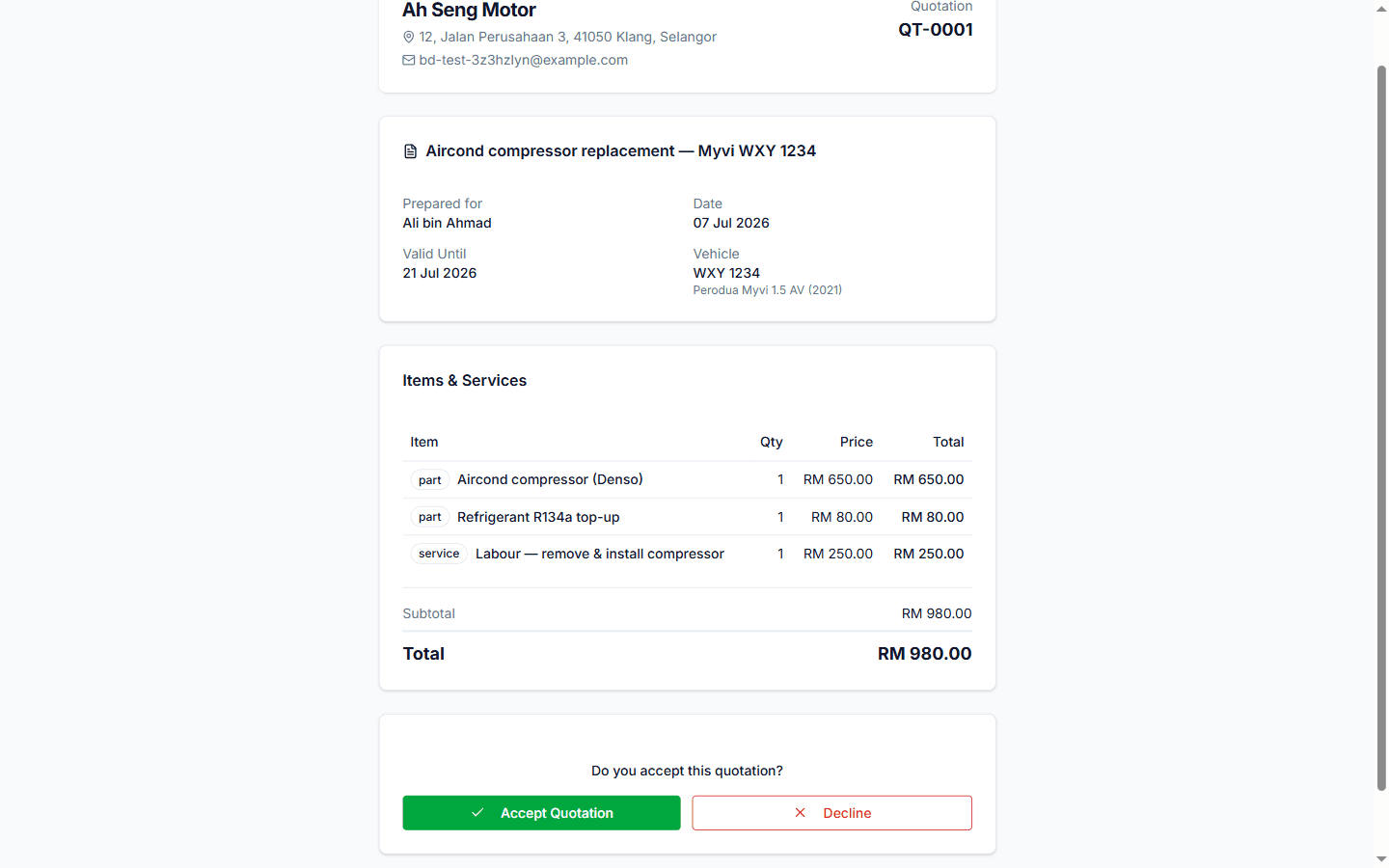
The link is private to that quotation — it contains a long random token, so only someone you've shared it with can open it. It's view-and-respond only; the customer can't see anything else in your workshop.
When the customer accepts
- The quotation shows Accepted in Quotations.
- Click Convert to Job Card — a job card is created with all the quoted items carried over. No retyping, and the price the customer sees on the final invoice matches what they approved.
- From there it's the normal flow: work the job card, then create the invoice.
When they reject or don't respond
- Rejected — follow up to understand why; you can create a revised quotation with adjusted items.
- Expired — the valid-until date passed. Create a fresh quotation if the customer comes back (prices may have changed anyway).
Quote → approve → job card → invoice keeps one consistent paper trail. If a customer later disputes a charge, you can show them the exact quotation they accepted, with a timestamp.
Still stuck?
Our team is happy to help — usually within a few hours.